

Image: Starlink
Disclosure: this article contains a Starlink referral link. Sign up through it and you'll get your second month free, and this site may also earn a benefit from Starlink, at no extra cost to you.
Ask around any caravan park or free camp in Australia and you'll find someone with a Starlink dish propped up on a tripod, a folding table, or the roof of their van. It's become the default answer to "how do you get internet out here" for a lot of travellers - but the plans, the pricing and the real-world quirks have all shifted enough over the past couple of years that it's worth a proper look at what you're actually signing up for in 2026.
Starlink Roam
From $85/month + hardware
Roam 100GB or Roam Unlimited, works while driving, no fixed address needed
Sign up through our link and get your second month free
Check Availability & Order Starlink RoamWhat Starlink Roam actually is
Starlink is a satellite internet service beamed down from thousands of low-orbit satellites rather than the handful of geostationary satellites older systems relied on. That's the reason it works so differently to old-style satellite internet: lower orbit means lower latency, so video calls, online games and anything else that hates lag are actually usable, not just technically connected.
The hardware is the same for every plan - a dish ("Dishy"), a Wi-Fi router, cabling, and either a tripod or a mounting kit. What changes between plans is the software: a Residential plan is tied to a fixed address, while Roam is the plan built for moving around - caravans, motorhomes, camper trailers, boats, or just a second home you visit a few times a year. Same box, different subscription.
There are two pieces of hardware worth knowing apart:
- Starlink Mini - a smaller, lighter dish with the router built in. Out of the box it ships with a standard AC power supply, same as the Standard Kit, but it can also run on 12-24V DC via an optional accessory (more on that below) - which matters a lot for caravan power setups. It's the easier unit to live with day to day, at some cost in raw performance.
- Standard Kit - the full-size dish, separate router and tripod. It draws more power and needs 240V (via an inverter, if you're off-grid), but it has a larger antenna and generally holds a more consistent connection, particularly if you're regularly fighting tree cover.
Plenty of long-term travellers run the Mini simply because it's less hassle for the power trade-off; others stick with the Standard Kit because the extra reliability under trees is worth the extra draw. Neither is a wrong answer - it comes down to how much shade your usual camps have and how much spare power you're carrying.
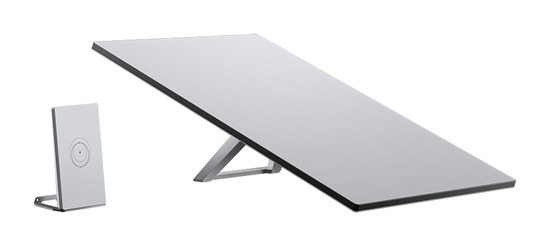
Standard Kit - larger dish, separate router, needs 240V.
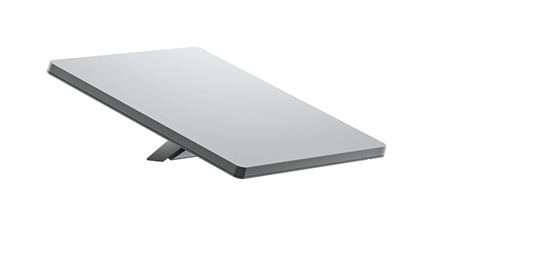
Starlink Mini - smaller, router built in, runs on 12-24V.
Setting it up and using it
Out of the box, Starlink is genuinely simple: plug the dish into the router, power the router on, and pair the Starlink app over Wi-Fi or Bluetooth. The app walks you through an obstruction scan - point the dish where you're planning to set it up and it tells you, based on the satellites it can currently see, whether trees or terrain will cause dropouts. This is worth doing every time you make camp, not just once, since the useful sky window shifts depending on which satellites are overhead and it's a better guide than guessing a compass direction yourself.
Day to day, that's really the whole workflow: unfold the tripod, run the cable, point the dish at open sky, and let the app tell you if you've picked a bad spot. No dishes to align by hand, no fiddling with elevation angles the way older satellite systems demanded.
The one thing worth building into your camp routine is checking a map's satellite view before you book a site, the same way you'd check for shade or slope. A site that looks fine on a booking photo can turn out to be boxed in by trees from the one direction Starlink needs clear.
What it costs in Australia (current as of September 2026)
Starlink's Australian pricing has moved more than once over the past year, so treat these as the numbers at the time of writing and check current pricing for your address before you commit. One term worth understanding before the numbers: "priority data" is data served at full, uncongested speed. Once you're off priority - either because you've used up a data allowance, or because your plan simply sits lower in the queue than someone else's - you still get a connection, just whatever speed is left over once priority traffic has been served first.
- Roam 100GB - $85/month. 100GB of priority data a month, then speeds drop to around 0.5Mbps for the rest of the billing cycle. Realistically enough for a couple checking email, browsing, and streaming in moderation, not for a family doing multiple video calls and Netflix every night.
- Roam Unlimited - $210/month. The same priority speeds as Roam 100GB, but with no monthly data cap - you stay on priority data all month instead of dropping to 0.5Mbps once you've used your allowance. This is the plan most full-time travellers and remote workers end up on once they see how fast 100GB disappears with streaming in the mix.
- Standby - $15/month. A low-speed (around 0.5Mbps), unlimited-data mode for when the van's parked at home and you don't need full speed, but want the account and hardware still active. It only works stationary - it switches off automatically once the dish detects you moving faster than about 16km/h, so it's not a "cheap mode for driving," it's a genuine pause replacement.
- Hardware - $289 (Mini) or $499 (Standard Kit), plus $19 shipping. This is a one-off purchase, not a subscription, and it's the same hardware whichever plan you put on it. Two optional accessories worth knowing about: a $92 Mini Car Adapter for running the Mini straight off a 12-24V outlet (see the power section below), and a $90 Starlink Router Mini - a compact WiFi 6 mesh router mainly sold for filling home WiFi dead spots, but also handy in a larger van or motorhome if the main router's signal doesn't reach the back of the annex.
One thing worth flagging if you've read older Starlink reviews or forum threads: the free "pause your service between trips" option that used to exist is gone. Pausing now means switching to Standby Mode at $15/month rather than dropping to $0. If you only travel a few times a year, it's worth doing the maths on whether it's cheaper to pay the $15/month Standby fee year-round, or to fully cancel and re-subscribe (at whatever the current sign-up price is) each time you head off.
Plan changes are handled sensibly at least - upgrading (say, 100GB to Unlimited mid-trip when you blow through your data) applies immediately with a pro-rata charge, and downgrading takes effect at your next billing date with nothing extra to pay.
Both Roam plans also cover more ground than just driving around Australia: Starlink lists International Travel as a standard Roam feature, and coverage as land and coastal use countrywide - useful if a big lap turns into an overseas trip, or you're often camped right on the coast. "Coastal use" is still about camping and driving near the coastline, not open-ocean boating - that's covered by Starlink's separate Maritime plans, not Roam.
Real-world performance
Speed is the part Starlink consistently delivers on. Typical download speeds sit above 100Mbps in most parts of Australia, comfortably enough for multiple people streaming, video calling and browsing at once - a different world to a phone hotspot in a fringe-reception town. Upload speeds are more modest, usually somewhere in the 10-30Mbps range, which is fine for video calls but worth knowing if your work involves uploading large files.
Two things reliably drag that performance down:
- Trees. Not clouds, not rain in most cases - trees. A dish with a decent chunk of tree canopy in its field of view will drop out every few seconds to every couple of minutes, which is tolerable for browsing and streaming (a short buffer and it picks back up) but genuinely disruptive for video calls or online gaming. This is the single biggest factor in whether a given campsite gives you a good experience or a frustrating one.
- Congestion in busy areas. Roam plans sit at a lower network priority than Residential, so in areas with a lot of Starlink users packed in - popular coastal strips, capital city fringes - you can see speeds drop noticeably during peak evening hours. Out in genuinely remote country, this essentially never comes up.
Weather is less of a problem than people expect. Heavy rain and snow can cause brief dropouts (generally minutes rather than hours), but cloud cover on its own barely registers. If you're choosing a campsite for internet, prioritise open sky over shelter from weather.
Power usage
This is the question that matters most if you're running off battery and solar rather than mains power, and it's genuinely different between the two hardware options.
- Standard Kit typically draws somewhere in the order of 50-75 watts once running, with a higher spike on startup and noticeably more again if it needs to melt snow or ice off the dish in cold conditions. Run continuously, that adds up to over a kilowatt-hour a day - a real dent in a modest lithium setup, and a lot to ask of a smaller AGM battery bank.
- Starlink Mini draws meaningfully less than the Standard Kit, and can run on 12-24V instead of mains power. The included kit powers it via AC, but Starlink's $92 Mini Car Adapter replaces that power cable and supply with a USB-C lead that plugs straight into a standard 12-24V auxiliary outlet - the same style socket as a car cigarette lighter - so you can run it off your caravan's 12V system without an inverter in the loop at all.
Two features are worth using if power is tight:
- Sleep scheduling in the Starlink app lets you set hours where the dish powers down automatically - overnight, or while you're out for the day. If you don't need internet at 2am, there's no reason to pay the power draw for it.
- Standby Mode (the $15/month plan mentioned above) also draws less power than an active connection, on top of not costing full plan price, if you genuinely don't need internet for a stretch but want to keep the hardware live.
Aftermarket DC power adapters and "power saver" modules for the Standard Kit do exist, with some owners reporting meaningfully lower draw using them - but they're third-party hardware modifying how the unit is powered, and it's worth reading up on current reviews and any warranty implications before fitting one, rather than treating it as a guaranteed fix. If your battery and solar setup is genuinely marginal, upgrading that setup directly is the more predictable fix.
Working out exactly how much battery and solar that adds up to - and whether your existing setup already covers it - is its own topic: see our solar and battery sizing guide for Starlink for the full watt-hour math.
Mounting it: tripod, roof, or somewhere in between
The supplied tripod is unglamorous but it's doing real work: it lets you move the dish to wherever the sky is actually clear, which - given how much trees affect the signal - is often not directly above your van's roof. A lot of experienced travellers deliberately avoid permanent roof mounts for exactly this reason: a fixed position that's perfect at one campsite can be useless at the next one over, boxed in by a tree your roof-mounted dish can't see past.
That said, permanent and semi-permanent roof mounts are common and plenty of people run them without issue, especially if you mostly camp in open country rather than deep under trees. A roof mount also removes the daily unpack/pack routine, which matters if you're moving on most days rather than settling in for a while.
Wind is the other real consideration with any elevated mount, roof or tripod. A dish mounted high and exposed catches gusts a ground-level tripod setup simply doesn't, and a strong enough gust can be enough to damage the mount even if the dish itself keeps working. If you do mount on the roof, factor wind exposure into where and how it's fixed down, and consider whether it needs to come down in genuinely severe weather.
Whichever mount you use, look after the cable. It's thinner and more easily damaged than most people expect for something meant to live outdoors, and a cable run across a site becomes a trip hazard fast. A dedicated cable reel keeps the slack managed and off the ground - Flat Out International make one sized for Starlink's cable if you want a purpose-built option rather than coiling it by hand.
Alternatives, and how they compare
Starlink isn't the only way to get internet on the road, and for a lot of travellers it isn't even the right first purchase. Here's how the realistic alternatives stack up:
- A 4G/5G hotspot with a data SIM. A device like a Netgear Nighthawk M5 or M6 paired with a Telstra, Optus or a Telstra-network reseller SIM is far cheaper up front and has no ongoing subscription beyond your data plan. The catch is coverage - it only works where there's a cell tower in range, which rules it out at genuinely remote or dispersed camps. For travellers who mostly stay within mobile coverage and only occasionally push further out, this is the cheaper, simpler option, and several long-term Starlink owners still carry one as a backup.
- A cellular signal booster (Cel-Fi or similar) with an external antenna and mast. This amplifies an existing weak signal rather than creating a connection from nothing, so it's only useful where there's some signal to work with. It draws far less power than Starlink and has no monthly plan of its own, but it's a genuinely different tool solving a different problem - "the signal here is weak" rather than "there's no signal here at all."
- Another Starlink Roam user's hotspot, or a caravan park's Wi-Fi. Free or included where available, but you're relying on someone else's connection and someone else's obstruction problems.
- Older-generation satellite internet. Higher latency, lower speeds and historically worse value than Starlink across the board - there's little reason to choose it over Starlink today unless it's genuinely the only option available at a specific location.
The honest framing most experienced travellers land on: if you can tolerate patchy or no connectivity for stretches of a trip, and your budget or power setup is tight, a hotspot and data SIM covers most of what you need for a lot less money and hassle. Starlink earns its cost when you need reliable connectivity specifically in the places a phone SIM doesn't reach - genuinely remote camps, working remotely from the road, or simply not wanting your trip planning limited by which spots happen to have signal.
Is Starlink Roam worth it for you?
A few questions worth answering honestly before you buy:
- How often are you actually travelling? A handful of trips a year makes the ongoing plan cost harder to justify than for someone on the road for months at a time - do the Standby-vs-cancel maths above before you commit.
- What's your power setup like? A well-sized lithium and solar system barely notices Starlink running. A smaller AGM setup will feel it, especially with the Standard Kit run all day.
- Where do you actually camp? If you mostly stay in caravan parks with decent mobile coverage, a hotspot and SIM may cover you for a fraction of the cost. If you're chasing genuinely remote free camps, that's exactly where Starlink earns its keep.
- Do you need it while driving, or just once you've stopped? Roam plans work in motion (up to around 160km/h); if you only ever need connectivity once you've parked and set up, that changes what you need from the plan and mount.
Putting all of that together, here's a rough steer on plan and hardware by traveller type:
| If you're... | Plan | Hardware | Why |
|---|---|---|---|
| A weekender or occasional camper (a few trips a year) | Roam 100GB, then Standby ($15/mo) or fully cancel between trips | Mini | Lowest cost and power draw for occasional use - do the Standby-vs-cancel maths above first |
| A full-timer or remote worker | Roam Unlimited | Standard Kit if you're often under trees, Mini if you're usually in open sky | Priority data all month with no cap to watch; hardware choice comes down to tree cover and power budget |
| Doing a big lap that might extend overseas | Roam Unlimited or 100GB, depending on use | Either | International Travel is included as a standard Roam feature, so the same plan covers both |
| Off-grid with a small solar/battery system | Roam 100GB or Unlimited | Mini + the $92 Car Adapter | Lowest power draw option, and runs straight off 12-24V with no inverter needed |
| A family streaming heavily every night | Roam Unlimited | Standard Kit if tree cover is an issue at your usual camps | 100GB disappears fast with multiple people streaming at once |
| Already have Starlink at home on Residential | Switch the same account to Roam before you go, back when you're home | Same dish - no second purchase needed | No extra hardware cost, though check the current switch-back price first (see FAQ below) |
Common questions
What's the difference between Roam and Residential, and can I take my home dish travelling?
Same hardware - there's no separate travel-only dish. If you've already got Starlink at home on a Residential plan, that's genuinely the same box you'd take with you; it's the plan that's location-locked, not the hardware. Residential is tied to a fixed address and won't reliably connect once you're away from it, while Roam has no fixed-address requirement and works both at home and on the road - plenty of people leave it running at home between trips, including as backup internet if their main connection drops out. Worth knowing that Roam doesn't pick up Residential's higher network priority just because it's sitting still at home, though - the plan you're on decides priority, not your location. You can switch a single account between Residential and Roam from your Starlink account portal when you're about to head off and back again when you're home, though there's no guarantee you'll get your original price back on the way back - it's worth checking the current cost of switching before you rely on it, or just running a separate Roam plan permanently if the back-and-forth isn't worth the hassle.
Does it need a constant power supply?
Yes, while it's running - it doesn't run off internal battery on its own. It doesn't need to reload any software after a power cut, though; turn it off and on and it picks straight back up.
Can I mount the Mini on my RV or caravan roof?
Yes, using aftermarket mounts and accessories. You'll trade some flexibility in chasing a clear patch of sky for the convenience of not setting up and packing away each time.
Can I have the same kit for a caravan as for a motorhome?
Yes - the hardware doesn't differ by vehicle type. What matters is the plan (Roam, not Residential) and where you're able to get a clear view of the sky.
Can I still pause my plan between trips?
Not for free any more. Standby Mode ($15/month) is the current option if you want the account and hardware to stay active at low cost between trips; fully cancelling drops the cost to $0 but means re-subscribing, potentially at a different price, when you head off again.
The verdict
For Australian caravan and RV travel, Starlink Roam does what it says: it gets you a fast, low-latency connection in places a phone simply can't reach, at the cost of a real monthly fee, a genuine power draw, and a dependence on finding clear sky at every stop. It isn't the cheapest way to get internet on the road, and it isn't the right first purchase for every traveller - but for anyone regularly camping beyond mobile coverage, working remotely from the road, or simply tired of planning trips around where the signal reaches, it currently has no real substitute.
Sorting out the rest of the camp setup too? Our caravan and RV packing checklist covers everything else worth having sorted before you leave.
Sign up through our link and get your second month free.
Check Availability & Order Starlink Roam
Last updated September 2026.